

The Ultimate Guide to Cloud Backups: Protecting Your Website and Data From Disaster
In the digital landscape implementing automated cloud backups is essential because website disasters happen when least expected, website disasters happen when least expected. Whether caused by
human error during a plugin update, a corrupted database query, a zero-day vulnerability
exploit, or accidental file deletion, losing website data can paralyze a business overnight.
The Vulnerability of Traditional Local Backups
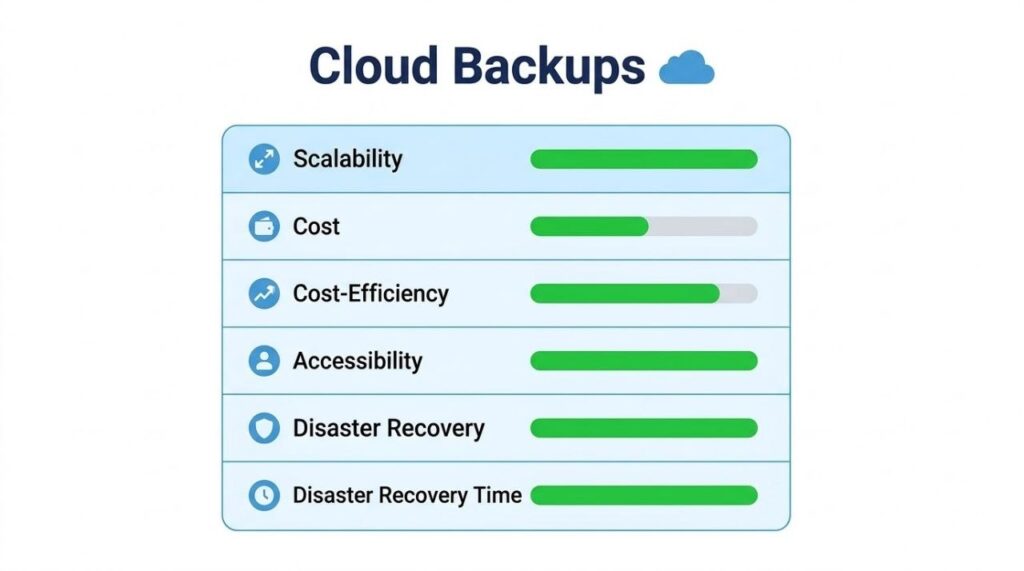
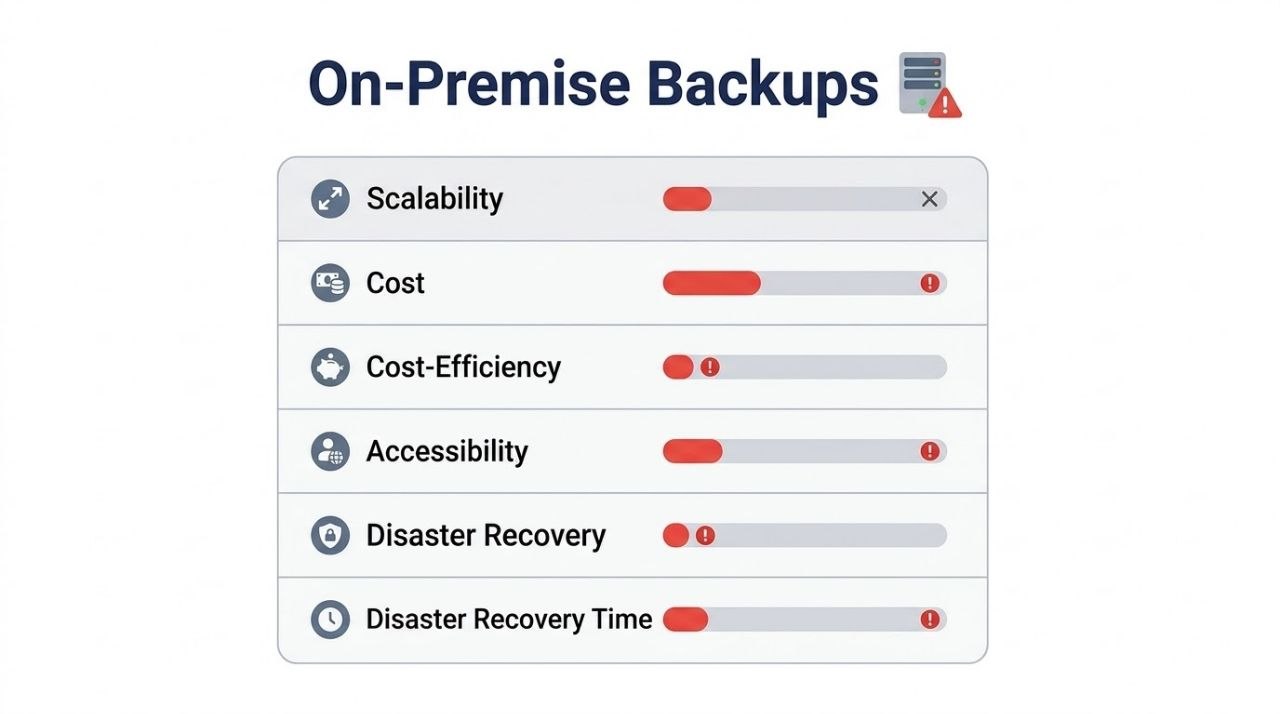
Traditional local backups stored on the same physical server are fundamentally flawed; if the physical hard drive fails or ransomware encrypts the server environment, local backups are destroyed alongside live production files. This reality has made automated cloud backups an absolute necessity for modern websites, e-commerce stores, and enterprise web applications hosted on cloud infrastructure.
How Automated Cloud Backups Work
Cloud backups operate by creating complete, encrypted snapshots of your website files, databases, system configurations, and email directories, transferring them securely to an isolated, redundant off-site cloud storage repository.
Unlike manual backups that require constant human monitoring and large local download spaces, automated cloud backup systems run on scheduled intervals—such as hourly, daily, or weekly increments—without interrupting live website traffic. When an unexpected crash occurs, system administrators can execute a point-in-time recovery, restoring the website to its exact healthy state within minutes and minimizing downtime and revenue loss.

Choosing the Right Backup Strategy
Choosing the right backup strategy involves understanding the distinction between full backups, incremental backups, and differential backups:
- Full Backups: Full backups copy every single file and database table every time, offering simple restoration but consuming substantial storage space and bandwidth.
- Incremental Backups: Incremental backups copy only the files and database rows that have changed since the last backup operation, making them extremely fast and storage-efficient.
- Differential Backups: Differential backups capture all changes made since the last full backup.
- Best Practice: For high-traffic cloud environments, a hybrid strategy combining daily incremental backups with weekly full backups offers the optimal balance of storage optimization and rapid disaster recovery.
Data Security, Encryption, and Ransomware Protection<p
Data security during transit and storage is another crucial factor when evaluating cloud backup providers. Because backups contain sensitive user information, financial transaction records, and administrative credentials, they represent prime targets for malicious hackers.
- Encryption Standards: Enterprise cloud backup systems must utilize strong encryption standards, such as AES-256 bit encryption for data at rest and TLS 1.3 encryption for data in transit.
- Immutable Backups: Furthermore, immutable backup policies—where backup files cannot be deleted or modified even by compromised administrative accounts—provide ultimate protection against advanced ransomware attacks designed to wipe out recovery points.
The Technical Mechanics of Cloud Backup Architectures
Block-Level vs. File-Level Backup Processing
Standard backup scripts process data on a file-level basis. If a single line of code changes in a 5GB database file, file-level backup software will upload the entire 5GB file again. This process wastes severe amounts of bandwidth and creates unnecessary server load.
In contrast, enterprise automated cloud backup systems utilize block-level tracking. The backup agent splits files into uniform binary blocks (typically ranging from 4KB to 64KB). When data changes, the system identifies only the specific modified blocks and transmits those isolated segments across the network. This drastically reduces transfer times and lowers compute resource consumption on live production servers
Global Data Deduplication and Compression Algorithms
Global Data Deduplication and Compression Algorithms
Storage efficiency is further amplified through source-side and target-side deduplication. Before any data leaves your primary environment, deduplication algorithms analyze incoming data streams to identify redundant files, system binaries, and database records.
When a duplicate pattern is detected, the backup system replaces the redundant data with a lightweight cryptographic pointer. Following deduplication, high-efficiency compression algorithms (such as LZ4 or Zstandard) compress the unique data payloads. This dual-layered optimization process typically yields storage savings between 30% and 70%, translating directly into cost efficiency for growing enterprises.
General Data Protection Regulation
Regulations like the General Data Protection Regulation (GDPR) and the Health Insurance Portability and Accountability Act (HIPAA) govern how personal identifiable information (PII) must be handled in backup environments:
- Data Residency Controls: Enterprise backup providers allow organizations to select exact geographic regions for primary and secondary backup storage to prevent illegal cross-border data transfers.
- Right to be Forgotten in Backups: Compliance mandates require mechanisms to manage personal data deletion requests without invalidating or corrupting continuous backup chains.
- Audit Logging: System administrators must maintain immutable, time-stamped access logs detailing every instance where a backup file was downloaded, restored, or exported.
Frequently Asked Questions About Cloud Backups
How often should I run automated cloud backups?
For active websites and e-commerce stores, running daily or even hourly incremental backups is recommended. This ensures that new customer transactions, user data, and recent blog posts are always saved without missing critical updates.
Can cloud backups restore my website automatically?
Yes, modern cloud backup systems allow administrators to perform a one-click point-in-time recovery, restoring the entire website, database, and settings to a healthy state within minutes.
How does an automated cloud backup protect against ransomware?
Automated cloud backups protect your infrastructure by storing encrypted, isolated snapshots off-site. Even if malware infects local server storage, cloud backups remain untouched, allowing immediate recovery without paying ransom fees.
What is the difference between cloud backup and cloud storage?
Will running automated cloud backups slow down my website performance?
What happens to my backups if my server crashes completely?
How much cloud backup storage space does a business website need?