The Ultimate Guide to Zero-Downtime Website Migration: Moving to Cloud Hosting Smoothly
Migrating an active website, web application, or bustling e-commerce store to a new hosting provider is often viewed by business owners and webmasters as a stressful, high-risk technical undertaking. Fears of prolonged downtime, broken database connections, corrupted files, security vulnerabilities, and lost customer transactions frequently discourage companies from upgrading their infrastructure.
However, staying on an outdated or underperforming server can severely harm your search engine rankings, user experience, and overall revenue. Moving to a modern, scalable cloud hosting environment does not have to cause service interruptions. With careful pre-migration planning, precise file synchronization, database replication, and proper DNS TTL adjustments, website migrations can be executed seamlessly with absolute zero downtime.
By transitioning your digital assets to high-performance cloud hosting with 99 Cloud Tech, you ensure your business remains fully operational, secure, and lightning-fast throughout the entire migration cycle.
Phase 1: Pre-Migration Planning & Technical Audit
A successful zero-downtime migration relies heavily on meticulous preparation. Attempting to transfer files without understanding your current infrastructure leads to missing dependencies, unexpected server errors, and extended resolution times
Proper preparation is the most critical phase of any zero-downtime website migration.
Cataloging System Dependencies and Assets
The migration process begins with a comprehensive technical audit of your existing hosting environment. System administrators must catalog all active domain names, subdomains, SSL/TLS certificates, cron jobs, email accounts, media libraries, and third-party API integrations.
Understanding your software stack—whether it relies on WordPress, WooCommerce, Magento, Laravel, Node.js, Python, or custom PHP scripts—ensures that the target cloud hosting server is provisioned with matching operating system dependencies, PHP versions, extension modules, and database engines (such as MySQL, MariaDB, or PostgreSQL) before the actual data transfer begins.
Setting Up the Target Staging Environment
Before pointing any live web traffic to the new server, a fully functional staging environment must be created on 99 Cloud Tech. This staging environment mirrors the production site entirely, allowing system engineers to test database connectivity, execution scripts, server caching rules, and SSL configuration without impacting real users.
Testing the site on a temporary staging URL or via local hosts file modification ensures that all broken links, permalink structures, and theme compatibility issues are resolved prior to the final switch.
Phase 2: Secure Data Synchronization & Database Replication
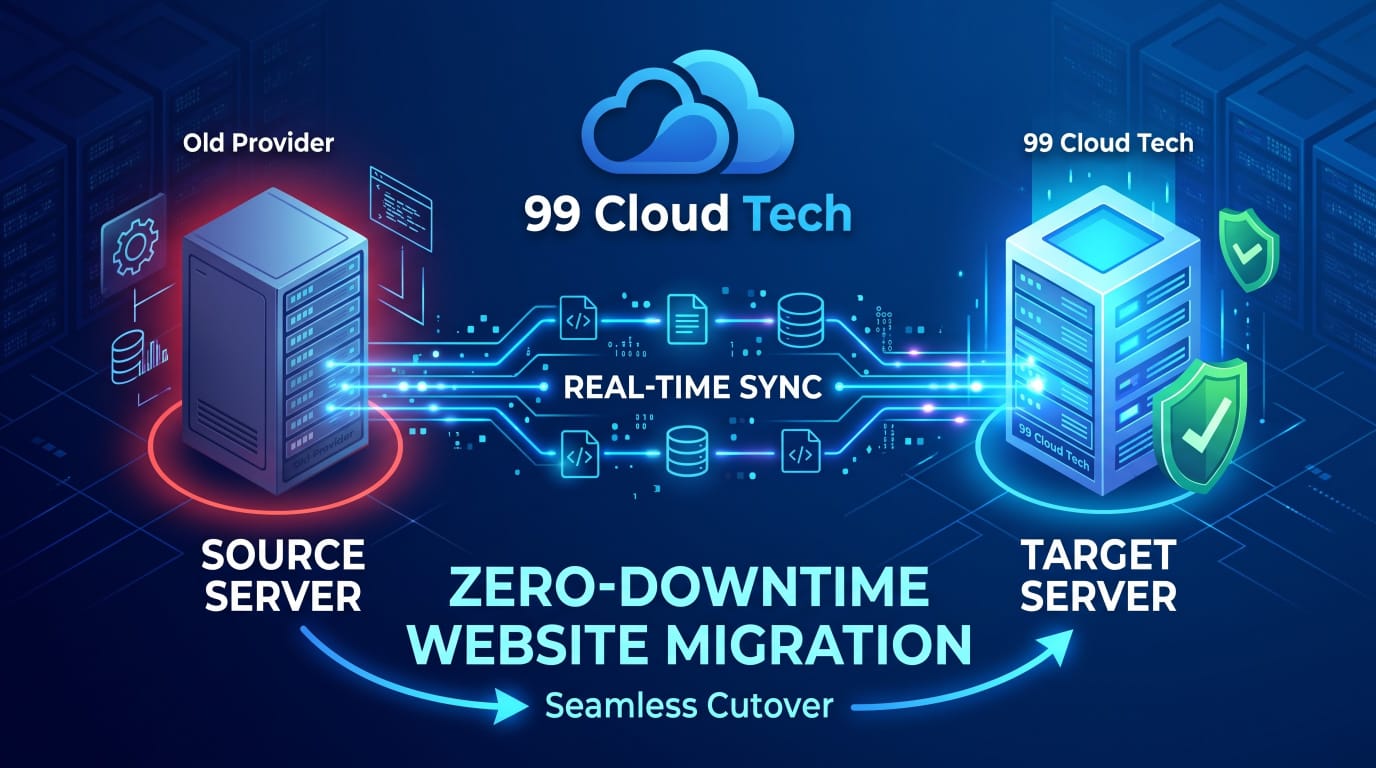
Once the target cloud instance on 99 Cloud Tech is configured, hardened, and thoroughly tested, the real-time data transfer phase commences. Transferring gigabytes of media assets and complex transactional databases requires advanced server-level tools to maintain data integrity.
Efficient File Transfer Using SSH and Rsync
Instead of relying on slow, unreliable manual file downloads and uploads through standard FTP clients, systems engineers utilize secure shell (SSH) protocols and CLI utilities like rsync. Executing rsync over encrypted SSH tunnels allows administrators to mirror website directories rapidly while preserving file permissions, ownership properties, and symbolic links.
Because rsync only transfers modified files during subsequent executions, it allows for fast delta syncs right before the official domain cutover.
Real-Time Database Replication and Binary Logging
Relational databases driving modern dynamic websites and e-commerce platforms require active synchronization to avoid losing customer transactions. Initial database dumps are imported into the new cloud database node, followed by master-slave replication or continuous binary log (binlog) synchronization.
This mechanism records every new user sign-up, order placed, or post comment on the live production server and instantly applies it to the new cloud server in real time. This keeps both environments perfectly synchronized, ensuring zero data loss during the transition window
Phase 3: Managing DNS Propagation for Zero-Downtime Website Migration
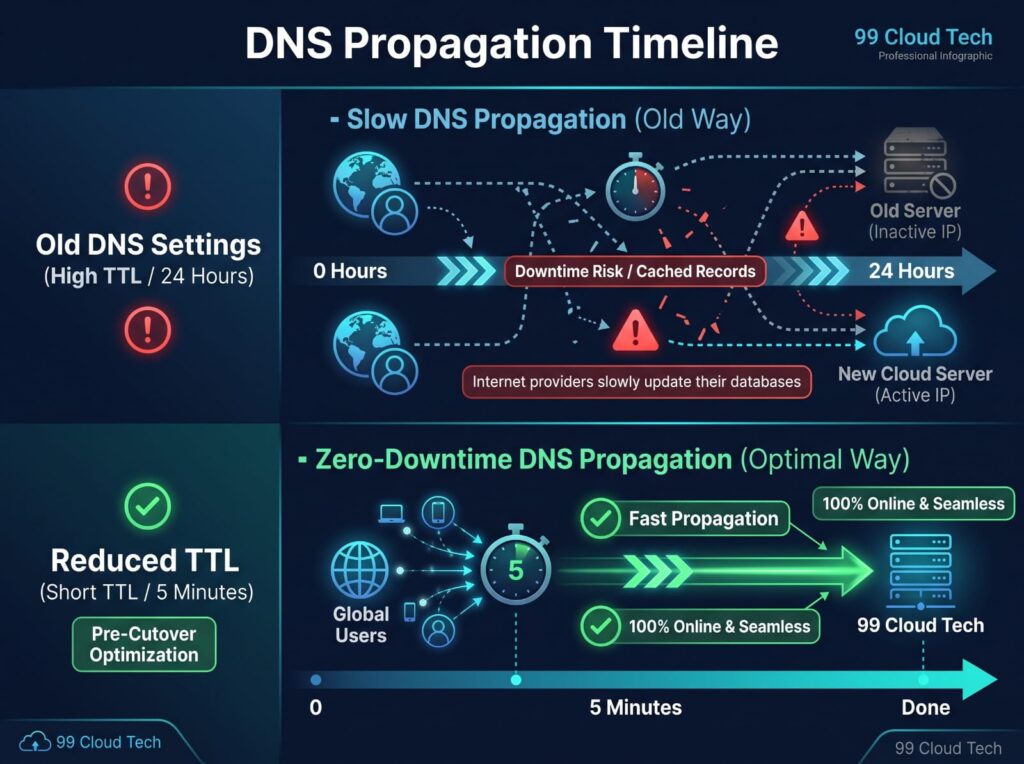
The final and most critical step in achieving a true zero-downtime migration is controlling Domain Name System (DNS) propagation across global Internet Service Providers (ISPs).
Pre-Cutover TTL (Time-To-Live) Adjustments
Executing the Final Switchover
Phase 4: Post-Migration Auditing & SEO Protection
Switching servers successfully is only half the battle; ensuring that your SEO rankings, website performance, and security mechanisms remain intact is essential for long-term business continuity. Completing these thorough post-migration checks guarantees a seamless zero-downtime website migration without losing traffic or domain authority.
Preserving Search Engine Rankings & URLs
Search engines like Google penalize websites that experience sudden crawl errors, broken 404 pages, or misconfigured 301 redirects after a migration. Post-migration audits must verify that canonical tags, XML sitemaps, robots.txt files, and internal linking structures remain identical to the original site.
Verifying Google Search Console and Bing Webmaster Tools immediately after migration helps detect any indexing anomalies early.
Post-Migration Checklist
- SSL/TLS Certificate Re-Verification: Ensure automated renewal tools (such as Let’s Encrypt or custom SSL) are actively securing HTTPS connections on the new server.
- Email Routing Verification: Test inbound and outbound MX, SPF, DKIM, and DMARC records to confirm corporate email flow is uninterrupted.
- Performance & Cache Optimization: Enable server-side caching (Redis/Memcached) and CDN integration to maximize loading speeds on the new cloud host.
- Log File Monitoring: Inspect server access and error logs (/var/log/nginx/error.log or /var/log/apache2/error.log) for unexpected 5xx errors.
Rollback Strategy: Preparing for Contingencies
By keeping the original source host active, powered on, and fully intact for 7 to 14 days after the DNS cutover, administrators maintain the ability to revert DNS records back to the old server instantly if critical unresolvable issues arise on the new environment. Maintaining this setup safeguards your business throughout the entire zero-downtime website migration process.
Frequently Asked Questions (FAQ)
1. How do you guarantee zero downtime during a WordPress website migration?
Zero downtime is achieved by maintaining two active environments simultaneously. We clone the website to a staging server on 99 Cloud Tech, synchronize the database and files in real-time, and only update DNS records once the new environment is fully verified. Visitors are seamlessly routed to the new server without experiencing service interruptions.
2. Will website migration affect my Google SEO rankings and traffic?
When executed correctly, a website migration will not negatively impact your SEO. By preserving permanent URL structures, setting up precise 301 redirects (if needed), updating SSL certificates, and lowering DNS TTL values prior to switchover, search engines continue crawling your site smoothly without encountering 404 errors or server downtime.
3. How long does DNS propagation take during a website cutover?
Standard DNS propagation can take anywhere from a few hours up to 48 hours. However, by proactively reducing the Time-to-Live (TTL) value to 300 seconds (5 minutes) a few days before the migration, the global DNS cutover occurs almost instantly for most users worldwide.
4. What happens to new database entries or e-commerce orders placed during migration?
To prevent data loss on high-traffic or e-commerce sites, we utilize live database replication and SSH delta syncs (via tools like rsync). This captures all last-minute transactions, user registrations, and content updates right up to the exact moment of the final DNS cutover
5. What are the main risk factors of a zero-downtime website migration?
The main risks include broken database connections, missing file permissions, and uncoordinated DNS propagation. Failing to configure a proper staging environment before launching a zero-downtime website migration can result in unexpected downtime or lost transactional data.
6. Can I perform a zero-downtime website migration on e-commerce platforms like WooCommerce or Magento?
Yes, e-commerce stores benefit the most from a zero-downtime website migration. Because online stores process live orders continuously, utilizing database replication and delta file syncs ensures that every order and customer profile remains intact during the transition to 99 Cloud Tech.
7. Why is setting a low TTL value critical for a zero-downtime website migration?
Lowering the Time-to-Live (TTL) value in your DNS settings instructs global internet service providers to refresh domain routing records much faster. This ensures that when the IP address changes during your zero-downtime website migration, users transition to the new host without experiencing cached offline pages.
8. What tools are required for executing a successful zero-downtime website migration?
A professional cloud hosting team relies on enterprise CLI tools such as rsync for secure file synchronization, MySQL binary logging for real-time database replication, and staging servers for comprehensive pre-flight testing prior to executing a zero-downtime website migration.
9. How do I test the new server environment before finalizing a zero-downtime website migration?
You can thoroughly test the target host by modifying your local hosts file or utilizing a temporary staging URL. Verifying database connections, SSL certificates, and page loading speeds before changing live DNS records ensures a flawless zero-downtime website migration.
10. What is the rollback plan if something goes wrong during a zero-downtime website migration?
A proper rollback plan involves keeping the original host active and operational for 7 to 14 days after cutover. If unexpected application errors occur, administrators can instantly revert DNS records back to the source server, ensuring total business continuity during the zero-downtime website migration.
Conclusion: Turning Infrastructure Upgrades into Seamless Growth
A website migration should never feel like a high-stakes gamble or a compromise between technical progress and commercial uptime. Modern cloud infrastructure demands speed, stability, and zero friction for your users. By applying structured pre-migration testing, real-time database replication, and disciplined DNS propagation management, transitioning your digital platform becomes a predictable, routine operation rather than a business risk.
Executing a flawless zero-downtime website migration is more than just shifting files from one server to another—it is an investment in your brand’s trust, search visibility, and operational integrity. At 99 Cloud Tech, we eliminate the anxiety of technical transitions, ensuring your business stays fully online, highly secure, and optimized for high-speed performance through every stage of your growth.